Best Options Trading Journals for 2026: 5 Ways to Track Your Trades
The best options trading journals and trackers for 2026 compared: OptionsVault, TradesViz, TraderSync, Wingman Tracker and a free spreadsheet template, with prices and who each suits.
On this page
- Quick comparison
- What an options journal has to do
- 1. OptionsVault: my top pick for the wheel, covered calls and cash-secured puts
- 2. TradesViz: for spreads and options analytics
- 3. TraderSync: for traders who also trade stocks and futures
- 4. Wingman Tracker: for traders who roll
- 5. A spreadsheet: free and fully yours
- How to choose
- FAQ
An options trading journal keeps the result of each position, not just the list of orders your broker already has. That sounds simple until a put gets assigned, you sell covered calls on the shares for a month, and the shares are called away. That is one position and six lines in your order history, and only the total tells you whether it worked.
These are five ways to keep an options journal in 2026, from free to $49 a month, and which kind of options trader each one suits. My top pick is OptionsVault, which I built for exactly this. If you trade mostly stocks or futures, my list of the best trading journal apps covers general-purpose journals.
Disclosure: I built OptionsVault, the first pick, and I say what it doesn’t do as well as what it does. The TraderSync link is an affiliate link: if you sign up through it, Investing 2.0 may earn a commission at no extra cost to you.
Quick comparison
| Journal | Best for | Price (October 2026) | Free option |
|---|---|---|---|
| OptionsVault | The wheel, covered calls, cash-secured puts | Free, or $5.99 a month | Free plan, 50 trades a month |
| TradesViz | Spreads and options analytics | $19.99 – $29.99 a month | Free plan, stocks only |
| TraderSync | Options alongside stocks or futures | $29.95 – $79.95 a month | 7-day trial |
| Wingman Tracker | Traders who roll positions often | $49 a month | 30-day trial |
| A spreadsheet | A few trades a week | Free | Always free |
Prices change often. Check each product’s site for the current numbers.
What an options journal has to do
A stock journal only has to match a buy with a sell. An options journal has more to keep straight:
- Tie each opening trade to how it ended. A sold put can be bought back, expire worthless or be assigned. The profit sits on whichever of those happened.
- Carry premium through assignment. If you sold a $145 put for $2.80 and were assigned, your shares really cost $142.20. A journal that forgets the premium makes the stock leg look worse than it was.
- Group the legs. A wheel, a covered call or an iron condor is several trades that only make sense together.
- Follow rolls. Rolling a position closes one contract and opens another. Treat them as unrelated and your win rate stops meaning much.
No tool below does all four for every strategy, which is why the right pick depends on what you trade.
1. OptionsVault: my top pick for the wheel, covered calls and cash-secured puts
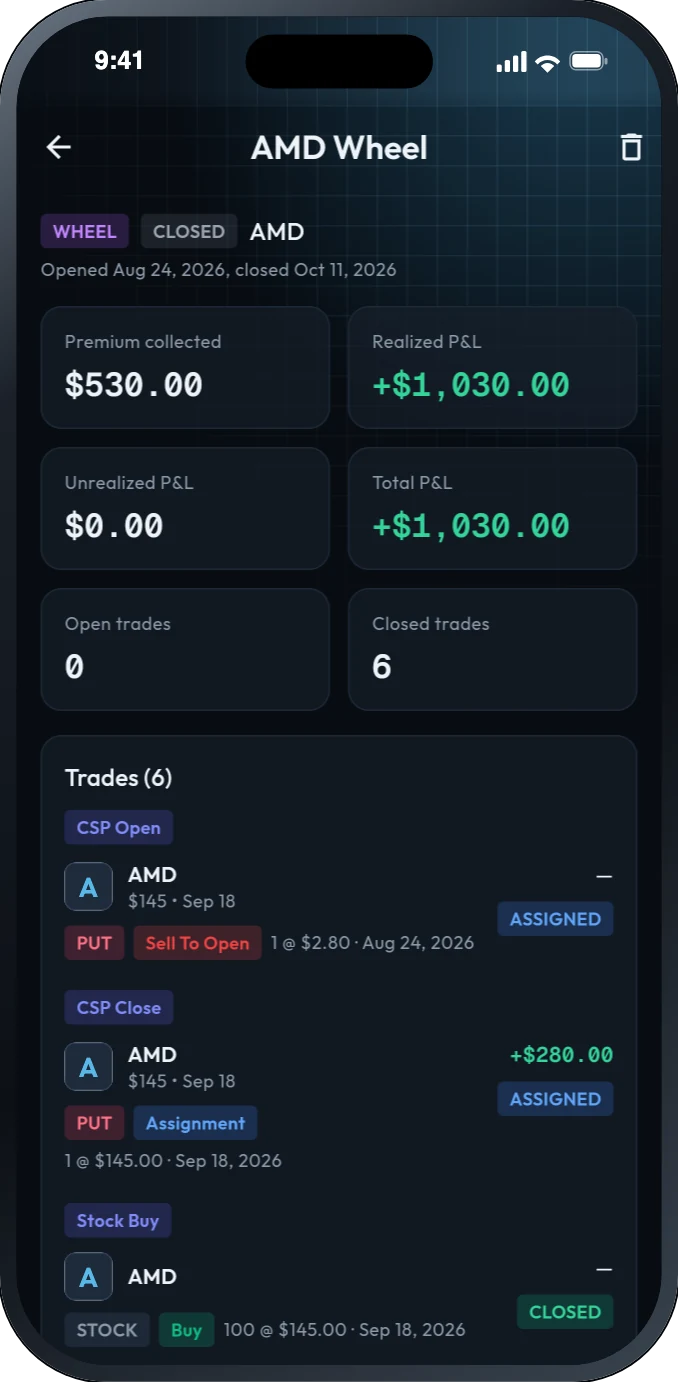
OptionsVault is built for people who sell options for income. It looks through your trades, finds wheels, covered calls, cash-secured puts and LEAPs, and groups each one into a strategy with its premium collected, realized P&L and total P&L, through assignment and call-away.
Here is one wheel on AMD from an example account. A $145 put sold for $2.80 brought in $280 and was assigned. A $150 call on the shares brought in $250, and the shares were called away at $150 for a $500 gain. Your broker shows that as six orders. OptionsVault shows it as one wheel: $530 of premium and a $1,030 profit.
Key features:
- Finds wheels, covered calls, cash-secured puts and LEAPs and groups them for you
- Premium, realized and total P&L for each strategy
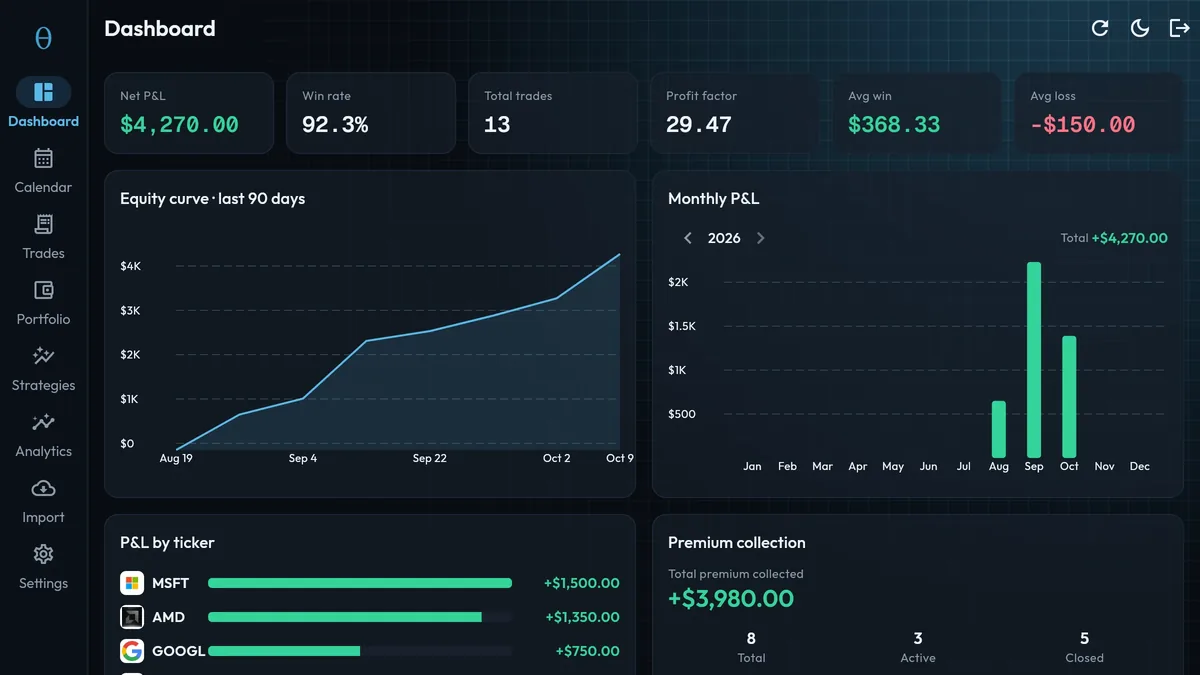
- Dashboard with net P&L, win rate, profit factor, an equity curve and P&L by month and ticker
- Calendar of daily P&L
- Automatic sync with Robinhood; any other broker by CSV import or entering trades by hand
What it doesn’t do: it doesn’t detect spreads or iron condors on its own, it doesn’t track a roll as one position, and Robinhood is the only broker it syncs with automatically. If those matter to you, look at TradesViz or Wingman Tracker below.
OptionsVault pricing
The free plan covers 50 hand-entered trades a month, two CSV imports a month and up to three active strategies, and finds covered calls and cash-secured puts. Pro is $5.99 a month as of October 2026, an early-access price, and adds Robinhood sync, unlimited trades, and wheel and LEAP tracking. See OptionsVault for current details.
2. TradesViz: for spreads and options analytics
TradesViz is a general trading journal with an unusually long list of options tools. Its pricing page lists automatic option spread and strategy detection, analysis of performance against the Greeks, options payoff charts and options strategy backtesting.
The catch is the free plan. It’s generous for stocks, with up to 3,000 executions a month for one account, but it covers stocks only. To journal options you need Pro at $19.99 a month ($14.99 a month billed yearly) or Platinum at $29.99 a month ($22.49 billed yearly). See TradesViz pricing for which tools come with which plan.
TradesViz suits traders who run spreads, condors and other multi-leg trades and want to study them in depth.
3. TraderSync: for traders who also trade stocks and futures
TraderSync is the most complete general-purpose journal I’ve looked at. It imports from a long list of brokers, has iOS and Android apps, and includes an AI assistant that reviews your trades. Reviews of the current version describe options support on every plan, with multi-leg trades classified automatically.
It has no free plan. Pro is $29.95 a month, Premium $49.95 and Elite $79.95, each with a 7-day free trial. See the TraderSync site for current pricing.
TraderSync makes sense if options are one part of your trading alongside stocks or futures and you want everything in one journal, on your phone as well.
4. Wingman Tracker: for traders who roll
Wingman Tracker is focused on options. It says it tracks covered calls, iron condors and more complex positions, and follows rolls so the P&L stays correct through each adjustment. That last part is rare, and it’s the main reason to pick it.
You bring trades in by exporting a CSV from your broker. It lists Schwab (including thinkorswim), Fidelity, tastytrade, E*TRADE and Interactive Brokers. There is one plan at $49 a month with a 30-day free trial. See Wingman Tracker pricing for current details.
5. A spreadsheet: free and fully yours
A spreadsheet is still a good options journal if you place a few trades a week. Ten columns are enough: trade date, ticker, type (stock, call or put), action (sold to open, bought to close, assigned, expired), quantity, price, strike, expiration, fees and notes. Premium, win rate and P&L by ticker can all be worked out from those.
To save setting it up, there’s a free options trading journal template (a CSV with those ten columns and a worked wheel) that opens in Excel, Google Sheets or Numbers, with no sign-up.
The limit is your time. Matching each assignment to the put that caused it and adding up a wheel by hand is fine for a handful of positions and tedious for fifty.
How to choose
- You sell puts and covered calls or run the wheel, especially on Robinhood: OptionsVault, my top pick.
- You trade spreads and iron condors and want options analytics: TradesViz.
- Options are one part of your trading and you want a phone app: TraderSync.
- You roll positions often and trade at Schwab, Fidelity or tastytrade: Wingman Tracker.
- You place a few trades a week: start with a spreadsheet.
Whichever you choose, the journal only helps if you review it. Once a month, look at your premium collected, your results by ticker, and the positions that got assigned. Those three tell you more about your options trading than any single trade.
FAQ
What is the best options trading journal?
It depends on what you trade. For selling puts and covered calls and running the wheel, OptionsVault groups each position into one strategy with its total P&L. For spreads and options analytics, TradesViz lists automatic spread detection and Greeks analysis. For traders who also trade stocks and futures and want a phone app, TraderSync covers options on every plan.
Is there a free options trading journal?
Yes. OptionsVault has a free plan for up to 50 hand-entered trades a month, and a spreadsheet costs nothing. TradesViz also has a free plan, but it covers stocks only; options need a paid plan.
How do I track the wheel strategy?
Record every leg: the put you sell, the assignment, the shares you buy, each covered call, and the sale when the shares are called away. Then add up the premium and the gain or loss on the shares. A journal that groups those trades into one wheel, such as OptionsVault, does the adding for you.
Can I use a spreadsheet as an options trading journal?
Yes, and for a few trades a week it works well. Ten columns are enough: date, ticker, type, action, quantity, price, strike, expiration, fees and notes. It gets slow once you trade every day or need to follow assignments and rolls by hand.
Questions about any of these? Use the contact form or email [email protected].